October 23, 2026
PropTech branding: how to make complex products easy to understand
9 minutes
In this article
Key takeaways
- Make PropTech branding specific: name the property type, the buyer, and the job your software handles before introducing individual features.
- Separate buyer and user messages. A management company evaluates operations; a resident needs to understand payments, requests, and everyday access.
- For products such as Unitify, show how managers, residents, and technicians use the same service for different tasks.
- Build visual identity around readable information, recognizable brand elements, and real product workflows.
- Test whether potential customers can explain your offer and find the next step without help from your sales team.
A founder can explain a property software product during a demo, answering questions as they appear. A website has to handle that conversation without the founder present. Every unexplained acronym, competing headline, and unlabeled screenshot leaves the visitor to work out how the product fits their building or business.
Where should PropTech branding start?
PropTech branding should start with a specific customer, a recognizable software category, and a problem that customer already needs to solve.
“Technology for the future of real estate” gives a visitor little information about what they can buy. A product for managing residential maintenance needs a different explanation from software for commercial leasing or property investment.
Write a working description before choosing colors or redesigning the homepage. For a hypothetical maintenance product, that could be: “Maintenance management software for residential teams that need to assign repairs and keep residents informed.” The category, audience, and purpose are visible in the same sentence.
Next, identify what customers would use instead. Ask whether their current process depends on spreadsheets, phone calls, messaging groups, or another software product. That answer gives your messaging something concrete to address.
A documented startup brand strategy helps carry those decisions into website copy, sales presentations, and visual identity.
How do you explain a product to buyers and everyday users?
Explain a PropTech product through a shared purpose, then give each audience a clear description of the work they can complete.
Unitify illustrates this approach. Unitify brings together residential building requests, billing, resident communication, access control, and building equipment. Unitify also provides resident and technician apps, alongside tools for management companies.
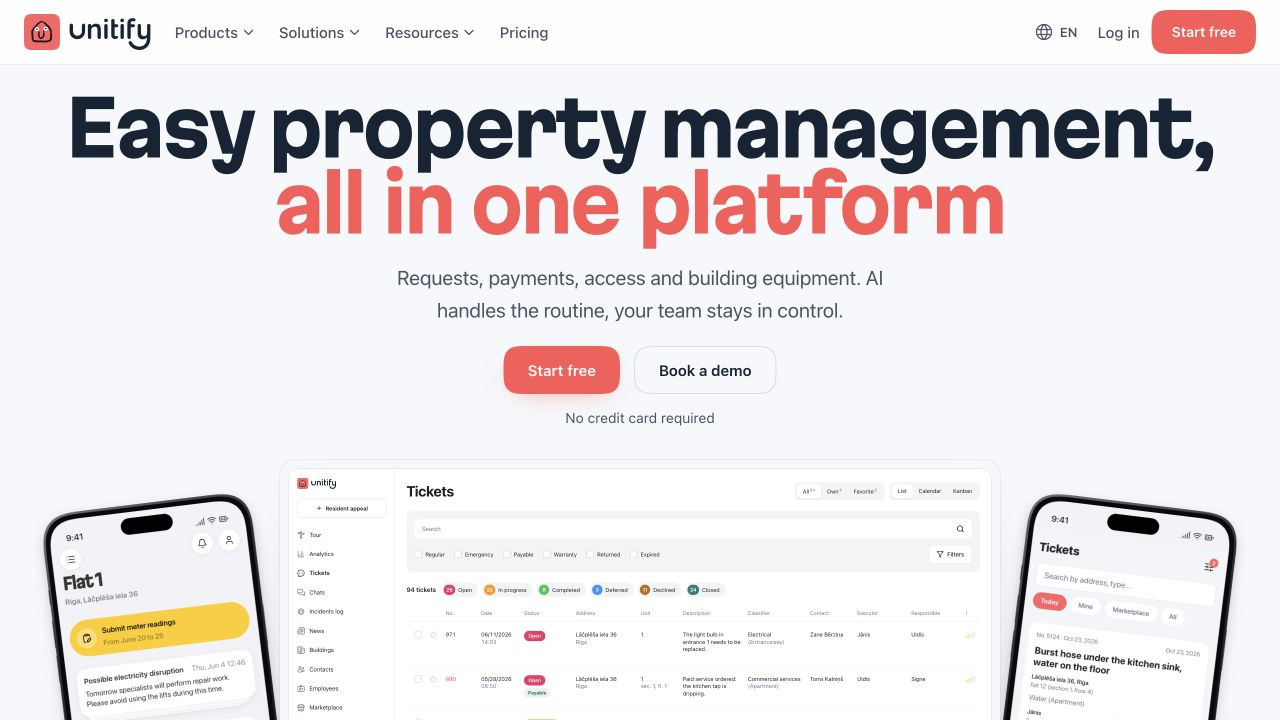
Those roles need different explanations. A manager evaluating request handling needs to see how work is recorded and assigned. A resident needs to understand how to submit a request. A technician needs to know where to find the assigned job and update its status. Each explanation should use the language of that role and show the relevant product screen.
Keep the company name, visual language, and overall product description consistent. Use audience pages or clearly labeled sections to explain the relevant tasks, screens, and next steps.
Someone considering Unitify for a residential building can explore the management workflow, then check how residents and technicians participate. That is a more useful evaluation path than reading an undifferentiated feature list.
How do you turn technical features into clear messages?
Turn a technical feature into a clear message by naming the action it enables and the person responsible for that action.
Keep technical terms where buyers need them, but explain their practical meaning. “Role-based permissions” may matter during evaluation. An accompanying explanation should make clear who can view, edit, or approve information.
The examples below are illustrative copy for products that support the described workflows.
Use the same test on your homepage: can someone describe what changes in their working day after reading the headline and supporting sentence?
What should a PropTech visual identity communicate?
A PropTech visual identity should make the brand recognizable while keeping property information and product explanations easy to read.
Choose typography that works across a marketing headline, a building notice, and an invoice. Test the palette with interface screenshots and dense information. Give status messages explicit labels so that color is not the only way to understand an overdue payment or an open request.
Build a recognizable combination of typography, color, imagery, and layout. A distinctive headline style or illustration approach can give the brand personality while leaving task descriptions straightforward.
Property photography should help visitors recognize the setting your product serves. Product imagery should show the actual work: a maintenance ticket, a resident notice, or a building overview, depending on the software.
When reviewing tech branding choices, ask what each visual element communicates about your specific product. Keep decoration from obscuring the information a buyer needs to evaluate it.
How can a built world brand communicate a broader offer?
A built world brand expanding its services or markets should explain the broader offer while keeping its sector expertise visible.
Our work on the Bloxspring rebrand provides an example from the agency side of the sector. Bloxspring had been known as a UK PR agency serving PropTech startups. The business was developing into a global brand and content partner for companies across real estate, construction, and climate innovation.
The existing identity and narrative needed to reflect that change. At Feely, we began with a workshop covering Bloxspring's services, audience, values, and ambitions. The work extended into brand messaging, tone of voice, visual identity, website copy, and a Webflow website.

The practical lesson for PropTech founders is to review the whole explanation when the business changes. A new audience or service needs a clear place in the positioning, website structure, and sales materials. A visual refresh should communicate those decisions consistently.
How should a PropTech website organize a complex offer?
A PropTech website should introduce the main offer first, then organize supporting information around customer roles and the tasks they need to evaluate.
Give the opening screen a clear product category, an intended audience, and a relevant next step. A real product screenshot can explain a workflow, provided the important details remain readable at the displayed size.
Introduce the core workflows before presenting a complete module directory. Visitors assessing maintenance software need to understand how requests reach the team and what happens next. Technical integrations can have their own page for buyers checking compatibility.
Use descriptive navigation labels such as “For management companies,” “Resident app,” or “Integrations” when those categories match the offer. Give a demo button enough context for visitors to know what they will see.
A considered SaaS website structure connects the initial promise with product explanations and evidence. Each page should help a visitor resolve a specific question before taking the next step.
What evidence makes a PropTech brand credible?
A credible PropTech brand supports product promises with relevant demonstrations, clearly described customer experience, and explicit implementation details.
Match evidence to the claim. A screenshot can demonstrate that a request has an assignee and a status. A documented customer study is needed to support a claim about reduced request handling time. A customer logo alone cannot establish that result.
Describe the property type and operating context when publishing a customer story. Readers should understand what was implemented, who used the software, and how any reported outcome was measured. Leave out performance numbers you cannot substantiate.
Explain setup with similar precision. State what information the customer must provide, which integrations are available, and which requirements need a separate discussion. Clarify the support available during the transition.
Review the language for implied promises, too. Words such as “automatic” and “instant” need a defined scope. Clear limits let a buyer judge whether the product fits their actual operating requirements.
How do you keep branding consistent after a customer signs up?
Keep PropTech branding consistent after signup by applying shared language and design rules to onboarding, product screens, notifications, and support materials.
A resident who receives an invitation should recognize the sender and understand which building or organization the message concerns. Payment instructions and maintenance updates need the same care as the marketing homepage.
White-label products require an additional decision: whose brand appears at each point? Unitify's branding options include customer branding inside the Unitify app and a separate app under the customer's name. These are paid options.
For a branded resident experience, document the visible organization name, logo placement, typography, and email sender. Define how residents distinguish the property manager from the software provider when they need help.
Include operational messages in the brand guidelines. Give writers examples of a payment reminder, a request update, an outage notice, and a support response. Each message should explain the situation and the action available to its recipient.
How can you test whether your branding is clear?
Test PropTech branding by asking potential customers to explain the offer and locate relevant information without a guided presentation.
Show a draft homepage to people who resemble your intended buyers. Ask them to describe the product, identify who it serves, and explain which problem it addresses. Record the language they use and the information they struggle to find.
Test audience-specific paths separately. Ask a property manager to find implementation information. Ask a prospective resident to locate an explanation of submitting a request. Choose tasks the proposed website is actually meant to support.
Repeated misunderstandings give you specific changes to make. Revise the category description if people mistake the product for a property listing service. Reconsider navigation if they understand the offer but cannot find a relevant workflow.
An iterative website process lets you check messaging and page structure before extending the design across the site. Retest the revised version with people who have not seen the earlier draft.
Frequently asked questions
What should a PropTech brand positioning statement include?
A PropTech positioning statement should identify the target customer, product category, problem addressed, and reason to choose the product. Use the property type or operating context when it materially changes who the software serves.
Should a PropTech homepage lead with AI?
A PropTech homepage should lead with AI when AI is central to the customer's reason for choosing the product. Explain the task AI performs and the human review required, using terminology the intended buyer understands.
Does each audience need a separate brand?
Different audiences can usually share a brand while receiving different messages and product explanations. Consider separate brands only when the offers, markets, or commercial relationships require a distinction that audience pages cannot communicate clearly.
When should a PropTech company update its branding?
Review branding when the product's audience or scope changes, or when prospective customers repeatedly misunderstand the offer. Identify whether the problem sits in positioning, messaging, navigation, or visual identity before deciding how much to redesign.

Next